Thursday, April 13, 2017

3D Printing Taking Hold at RAMS

Mr. Conant's social studies classes have recently been exploring their creative side by designing temples and other buildings as a culminating activity in their study of ancient Greece. Students' designs were then printed out using the RAMS 3d printer allowing students to see their designs come to life. This is a great way to increase student engagement with an authentic project that also challenges students' spatial senses and technical ability.

Students first used a number of resources to become experts on ancient Greek architecture and to conceptualize an original building design.

Then, students used Tinkercad, a free online 3d building application, to construct their design. Tinkercad has a simple interface and is being used by students at Miller, but it also is flexible enough to engage our middle school students.


Finally, students sent their creations to Mr. Steiner to be printed out on the RAMS Flashforge Creator Pro. Voila!


Friday, April 7, 2017

Speaking and Listening in the HHS Language Lab

Students in HHS Spanish and French classes make frequent use of the dedicated Language Lab for speaking and listening. The lab consists of 28 student stations that are interconnected by computer to a teacher station. Through headsets, students can participate in a number of language-related activities, such as:

  • speaking in pairs or small groups
  • practicing and review pronunciation
  • creating recordings of speaking for teacher feedback
  • practicing AP Exam-related activities. 
During these activities, teachers can listen on individuals and groups to given targeted, one-on-one feedback and correction. Teachers can also make recordings of student speaking, for later review and suggestions.

Teachers are scheduled in the lab on a rotating schedule, so that students can get as much time in the language lab as possible.

HHS Classes Incorporate Maker Space Technology


Students in HHS classes are learning to use the new Maker Space to combine academics, technology, and creativity to design and make their own interesting products.

Students in Ms. Chestna's and Ms. Rivera's Foundations of 21st Century Learning class have been learning about the process of 3D design, modeling, and printing using the school's new Maker Space 3D printers. Students learn about basic 3D design using free online software called Tinkercad. Students begin by designing customized key chains with their names on them, and then print their designs in PLA plastic. Later in the course, as a part of their culminating project, students then design, print, and iterate their own inventions.


Similarly, some HHS art classes have been using the Maker Space's vinyl cutter to create real-life products. Students in Graphic Design class use Adobe Illustrator to design one-color vinyl stickers that can be precision cut in the Maker Space. Students in Printmaking class use BoxySVG software to design precision cut silk screen masks, to be able to print posters and high-quality T-shirts.


After class, students can also use the 3D printers and vinyl cutter as a part of their own individual learning projects, both during the DSB period and after school.

Friday, February 10, 2017

New Digital Music Lab at RAMS

This fall, Adams Middle School was able to outfit a brand new state of the art music lab consisting of 15 iMac computers, midi keyboards, microphones, and headsets. Mr. Grina has been bringing groups of excited students to the lab all year and told us a bit more about how students are using the lab.


He explained, "All electronic activities take place through the iMacs (except the occasional extra use of Chromebooks when they need to create documents, for example). For web-based learning activities/games, videos, etc., we use Safari. 

The MIDI keyboards need to go through a software on the computer to work, for which we use GarageBand. We are wrapping up our piano-focus unit where we just worked on keyboard skills, now we are moving on to our first recording project using GarageBand's recording features. Later this year we will also be exploring the use of multi-track recording and combining pre-made and custom loops."

Wednesday, January 18, 2017

#HollistonTechPD Day Focuses on Digital Learning

On Friday, January 13, 2017, Holliston Public Schools hosted its Fourth Annual #HollistonTech PD day!  While the title highlights technology, the main focus of the day revolved around advancing students’ digital learning in meaningful ways.


The day began at 8:00 AM at the Robert Adams Auditorium with guest speaker, Kerry Gallagher.  Ms. Gallagher, an award winning digital learning specialist at St. John’s Prep in Danvers, Massachusetts, presented a keynote speech that demonstrated meaningful ways to engage students by first asking a compelling question, and then leveraging technological tools where students can conduct research, collaborate, problem-solve, and communicate their answers to a broader audience.  She provided educators with both inspirational remarks and tangible examples pertinent across developmental levels.

Educators then headed to breakout sessions; educators chose among a multitude of offerings during three breakout sessions held through the rest of the day.  Each breakout session was delivered by a Holliston educator with a specific expertise to share with colleagues across the district.  We even had Holliston High “PIT Crew” students share their knowledge of Chromebooks with faculty!  Some examples of topics included:
  • Students applying coding skills in projects across the content areas.
  • Student and teacher use of Screencastify to record audio/video over text.
  • Providing greater access through Augmentative-Alternative Communication.
  • Student applications of 3D Printing and Makerspaces across the curriculum.
  • Teachers ability to leverage online Professional Development resources across a multitude of topics.
  • Students accessing embedded rubrics when writing within Google Docs.
  • Online formative assessment applications in use in the classroom to broadly gauge student learning in the moment.
  • Student use of tablets in elementary classrooms during learning centers.

It was a great day of professional learning and we look forward to additional opportunities where these new skills will be applied in classrooms through the rest of 2016-2017.

Wednesday, December 21, 2016

A NASA Scientist Visited Mrs. Doire's Class for the Hour of Code

Last week at RAMS, Mrs. Doire arranged for a presentation by, Kimberly Arcand, a scientist for the Chandra Space Telescope and NASA.  One of Kim's responsibilities is to intercept binary code from the telescope and then create color to give meaning to what we see in space, which was a perfect companion to the international celebration of the Hour of Code.

Kim began by talking with the students about NASA and her professional background.She then gave a brief overview of the spectrum of light so that kids understood the coding activities that followed. The kids then moved from simple coding activities where they change the color of a box, to a complicated a coding activity where they color exploding and newly born stars in the galaxy. 


This visit was so valuable because Kim helped to give the students context for the coding activities that they were doing. In addition, the students were very interested to know that what we see with our own eyes is so limited and it takes a scientist and computer programming to interpret data from a telescope!

Tuesday, November 29, 2016

gra_512.jpg


By Brenda Maurao, Assistant Principal at Miller Elementary School

This fall, Miller students and staff had the opportunity to participate in a global program that brings students around the globe together to discuss a common book. During a six week period, from October 3 through November 11,  classroom teachers read aloud to students and engaged in discussions through a variety of online platforms about a common book.  

Teachers selected between two books to read to students during the Global Read Aloud:  Pax by Sara Pennypacker or The BFG by Roald Dahl.

The idea of the Global Read Aloud is for students to make connections with people around the world based on the shared love of reading. During and after reading the book together in class, students  engaged in online discussions with other students using a platform such as Edmodo, Google Hangouts, Twitter or Skype. Pinterest and Facebook were great resources for teachers, too.   Each teacher participated at a pace and format that meshed with regular classroom activities.  

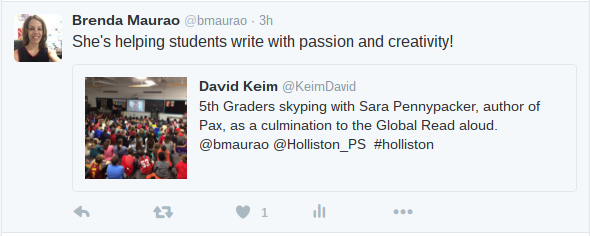
Fifth graders who read Pax ended the Global Read Aloud with a SKYPE presentation and question/answer session (highlighted in the tweet below)!
Screenshot 2016-11-22 at 3.47.29 PM.png

Informal discussions have begun as Miller teachers begin reflecting on this year’s experience with the Global Read Aloud.  We look forward to submitting possible book titles for next year, along with having school-wide discussions to plan the event next year.  Here are the reflections of fifth grade teachers Ashley DeRoy and Sara Peters: Video Interview with Ashley DeRoy and Sara Peters

For more information on The Global Read Aloud, please click on the presentation below!  

Saturday, November 19, 2016

Technology Is Helping to Meet the Needs of All Students at RAMS


The one to one Chromebook program at Adams Middle School has enabled students to customize their device to meet their own needs. In some cases, this is directed toward personal preferences, but students also frequently install apps and extensions that allow the Chromebook to more closely match up with their learning needs. Mrs. Ondrasek's students recently explored three of these apps Read & Write for Google, Google Docs voice typing, and Readability.

ExtensionRead & Write for Google is a Chrome text to speech extension that allows a student to quickly have documents and websites read to them using a customizable voice. A premium version of the extension, which is free for teachers, also produces picture and visual dictionaries and highlighting tools.

Image result for google docs voice typingGoogle Docs voice typing is a built-in speech to text capability in Google Docs. Because the school Chromebooks have a built-in microphone, students are able to type using their own voice. This is an excellent choice for students who are struggling with typing or prefer to compose aloud.

Finally, the Readability extension removes all the clutter from web pages, which tends to be an issue in particular when visit news websites such as CNN. The extension also enlarges and brightens text for easier reading.

Tuesday, October 25, 2016

Mme Picard's students explored Massachusetts with Buncee

Mme. Picard’s students recently used an online presentation tool called Buncee to organize and present information about a Massachusetts city or town. Buncee is similar to Powerpoint, but has animation capability so that objects and text can move around each slide. Students chose a person who lives in Massachusetts (but not Holliston) and wrote that person a letter asking them to share a postcard from his/her city or town. The students then used the website - http://fr.city-usa.net/ to find information about their town (county, area, population, year of origin, famous people from the town and interesting facts) and record it on a Google Drive chart.


Finally, the students used their information to produce the Buncee presentation. Students chose fitting images and added animation to bring their presentation to life.


Thursday, September 15, 2016

The Year Ahead -- A Preview!


It’s an exciting start to the 2016-2017 school year! We are off and running with innovative and modern instructional strategies within classrooms as we work towards developing Digital Learners!

IMG_1079.JPG
Today’s Digital Learners need to be:
  • Empowered learners
  • Digital citizens
  • Knowledge constructors
  • Innovative designers
  • Computational thinkers
  • Creative communicators
  • Global collaborators


Does this sound familiar?  Well, these are the new, 2016 ISTE Standards for Students, released this summer. In Holliston, we have been using the previous standards to guide our work. We are excited about the new focus areas including global education, computational thinking, and design. We are working toward incorporating the 2016 standards in our curriculum, which is connected to one of our 2016-2017 district goals.


This year, Placentino and Miller students are experiencing further technology integration of the Nexus 7 and Google Chromebooks within their classrooms. Teachers are actively incorporating these devices into whole class and small group instruction.


On the tablets, apps such as The Foos, Kids Math Place Value, and Prodigy allow students to experience learning in a personalized way. The environment is very game-like, but one that is designed to help students learn!  The tactile experience for our youngest children is perfect developmentally! Older students are using the Chromebooks and are exploring Google Apps for Education and using the platform for communicating and collaborating, including through research projects. Through classroom use and computer class, students are also developing important skills for digital citizenship; students also experience typing instruction.


At the middle school, students are continuing to experience learning in the 1:1 Chromebook environment. Learning in a digital environment is becoming integral to how they learn -- from where they gather information (online resources and digital texts) to how they convey their learning (through creative projects). Some examples include:


  • Google Classroom for collaboration, formative assessment, and organization of student work
  • Kahoot -- a game show-like platform to gauge student understanding
  • WeVideo -- creation of student videos


1:1 Chromebooks has launched for grades 9 and 10 at Holliston High School.  Early feedback has been very positive. With students on the same platform, teachers can reliably use technology to enhance their lessons and students can use it to demonstrate their understanding. Also this year at the high school, the PIT crew (Panthers Instructional Technology) is in full swing. This student group provides technical support to students and teachers through a technology Help Desk located in the library. Additionally, they provide support to the high school’s Makerspace…drumroll please...


Makerspaces are here! A Makerspace has been installed in the Holliston High School library. This expands upon opportunities students have to engage in “the making movement” at Miller and Adams. Students are exploring elements of design-thinking through the use of tools such as vinyl cutters and 3-D printers. These are exciting opportunities for students to tinker and stretch their creative side to design and create!

Stay tuned to our blog to learn of many more examples of digital learning in Holliston throughout the year.

Wednesday, May 25, 2016

Digital Portfolios in the Elementary Classroom - Seesaw


Elementary school teachers are very excited about the new learning journal app: Seesaw.   Seesaw helps teachers and parents connect with students and keep track of their school work.   Think of Seesaw as a journal for what students learn at school: stories they wrote, math problems they solved or art projects they made.  It is a simple way for young students to independently document what they are learning at school.  It empowers students to take more ownership of their learning.  

Using the Nexus 7 tablet, students scan a QR code, created by Seesaw, to access their class.    Once they are in their class they use the tablet to draw, write and record videos or take pictures of their handwritten work.  Teachers can access Seesaw on a tablet or on their computers to view all of the work the students have created independently. 


Kindergarten teacher Nen Locke has this to say about Seesaw: “The biggest way Seesaw has helped my classroom is with parent communication. Prior to Seesaw, I was writing emails and sending individual pictures to parents.  I would also update my webpage weekly. However parents weren’t getting information in a timely manner.  Now that I use Seesaw, parents have loved getting real-time updates on what their children are working on in class and how they are making progress."  Jennifer Rosenfeld, a parent in Mrs. Locke's  class is impressed with the weekly video newsletter the students create themselves.  The children report on their weekly successes and upload the videos to Seesaw on their own.

Mrs. Locke's students are engaged and invested.  Student involvement means success all around! 


Monday, May 9, 2016

Come to the Colonies with Mrs. Vittoria

Over the past two weeks, Mrs. Vittoria's 5th grade class has completed their "RAFT" project, which traditionally has asked groups of students to prepare a class presentation on the American colony the group was assigned. However, this year, students had the option to create a recorded digital presentation rather than a face to face presentation.


After researching the colony, the students had a few options for demonstrating their knowledge. They could create an audio-only podcast, an animated presentation using voki.com, or a green-screen video newscast or infomercial. Students found this much more engaging and interesting than a traditional presentation - and by providing a recorded option we enabled students who are not comfortable with in-class presentations to have an opportunity to demonstrate learning in a way that worked for them.

Monday, May 2, 2016

HHS PIT Crew: A Student Tech Support Team

In April 2016, HHS  launched a pilot program of a student tech support team. The team, called the "PIT Crew" (for Panthers Instructional Technology) is comprised of boys and girls, grades 9-12, who have an interest in technology and tech support.

The team meets four days a week, during the Directed Study Block period, to assist students and teachers with tech support issues, such as issues with printers, projectors, and document cameras, help using laptops and student devices, maintenance of computer labs, and repair of desktop PC computers.

The team has also been trained in Chromebook repair, and is working on refurbishing non-functioning Chromebooks from the middle school.

In May, the team will be opening a Help Desk that students can visit, for help with their BYOD technology. This Help Desk will allow HHS students to get peer-to-peer assistance with their computer and smartphone tech.
PIT Crew students receiving training in Chromebook repair

PIT Crew students re-wiring the HHS Library PC Lab


Tuesday, March 22, 2016

Mrs. Hebert is Bringing Her Students' Art into the 21st Century

Mrs. Hebert, RAMS art teacher, has revamped her curriculum at Adams this year with "Teaching for Artistic Behavior," or  “TAB”. This curriculum framework emphasizes student choice, teaches artistic techniques rather than projects, and encourages students to make original work while developing creative thinking. She has also been leveraging technology to make her classes more relevant and engaging for her students. This has included the creation of instructional videos and the use of her website to feature student artwork.
In addition, Mrs. Hebert has developed an online portfolio program using Artsonia, an amazing platform for storing and sharing student work. Traditionally, portfolios in the visual arts have been used to showcase an artist’s best work. For 21st century learners, digital portfolios are an effective assessment tool, providing evidence of growth, documentation of student process, creating an opportunity for self reflection and ease of sharing with a larger audience.  Parents are able to view their son/daughter’s work as soon as they upload it. This allows each individual student to view their progress over time and to think about potential areas of improvement.

Throughout the year, as students complete W.O.W. pieces (Wonderful, Original Works of Art), they are use class iPads to scan the RAMS  artsonia QR code. This connects the student with their digital portfolio, and they can upload a digital photo of the artwork. After editing the image, the student can add an artist’s statement, an important reflective step in the creative process, explaining their techniques, materials, challenges, inspiration, etc.


Click here for more information about Artsonia.

Differentiated Instruction

First grade teachers Mrs. Wipfler, Mrs. Berman and Mrs. Bourque created a WIN (What I Need) block for their students based on assessment data.  Upon completion of a place value unit in Math, they administered  an end of unit assessment.  The teachers used Excel to do an item analysis of student data. They used these results to differentiate their instruction and  target skills for each child.

Three groups were formed.  
The Strategic Intervention group had difficulty with the concept and were in need of a concrete learning experience.  The students used manipulatives for a reteaching lesson.  Manipulatives have both a visual and tactile appeal and help to present the concepts explicitly.
The On Level group understood the concept but could benefit from continued practice.  They participated in a cooperative learning game from our online EnvisionMath program (the Core Math program).
The Advanced group demonstrated mastery of the unit and were assigned an App (Kids Math Place Value) on the Nexus 7 tablets. This extension activity provided students the opportunity to engage in challenging lessons.

The use of technology allowed the teachers to assess students' needs and then vary the complexity level of the activities. It helped them address student variables by manipulating level of difficulty of the content.

Monday, March 21, 2016

Literacy Portfolio in Ms. Mazzola's HHS Special Education Class

Students in Ms. Mazzola's Language, Literacy, and Composition special education class have been using Google Sites to create online learning portfolios of literacy strategies.

Throughout the year, students acquire and develop specialized strategies for reading, writing, and listening that they can use in the core and elective classes. As the year progresses, students add these strategies to their Google Site portfolio, organized and accessible whenever they need them.

The students get trained in how to create and customize the website/portfolios themselves, and they are in charge of managing its contents, adding new reading, writing, or listening strategies, and referring back to the portfolio when they need it. They are learning 21st Century web development skills at the same time that they are enhancing their ELA literacy, and are creating portfolios that they can use from year to year.

Virtual Coffee Talks at RAMS

In an effort to expand Adams' administrators ability to communicate in alternative ways with parents, Mr. Botelho and Mr. Jordan have participated in two online video forums to answer questions submitted by parents. The video feed of the coffee talk was hosted with Google Hangouts on Air, which produces a Youtube link for viewing. Parents submitted questions with a Google form so that we were able to view questions in real time.

There will always be a place for face to face meetings, but this has provided a nice occasional option for parents who struggle to attend in-person events. In addition, the Hangout on Air platform provides a recording of the event so that it can be viewed later.


Watch our past virtual coffee talks:


November 4. 2015
Topics discussed:
1:49 club ideas
6:04 make-up tests
6:55 retakes for poor grades
8:43 field trips
12:52 school hours
14:22 5 day cycle
16:30 online portfolios
17:30 arts portfolios
18:28 wellness
20:30 scheduling tests and projects
21:20 student stress
22:45 homework
31:00 technology
38:10 plants in lobby
41:15 block scheduling
44:30 why Chromebooks?
48:42 parent/teacher conferences
52:30 homework limits
56:00 web monitoring of Chromebooks
57:00 drug and alcohol education
58:10 Internet work on snow days
February 9, 2016
Topics discussed:
1:00 MCAS schedule
4:27 iParent
5:25 student stress task force
6:56 homework survey
8:06 advice for parents regarding Chromebooks
11:05 teacher use of technology during class
11:35 spelling bee
12:42 notification system
14:02 date reminders
15:22 budget new initiatives
21:15 9th grade Chromebooks?
22:02 assessment retakes
25:35 Chromebooks over the summer?
27:17 homework policies
35:00 homework survey
35:50 student stress
37:37 why different Chromebook each year
38:05 Spring musical
40:10 general technology issues


Thursday, March 3, 2016

Using Data to Improve Learning

Holliston teachers from across the district are participating in a data course taught by STEM Specialist Pat Rourke.  This fifteen session course, “Using Data to Improve Learning”, provides the tools that educators need to function as effective improvement teams. Participants have learned to collaboratively analyze classroom data and use it to plan and monitor instruction which leads to targeted student improvement.

Participants explore the skills necessary to lead or participate in Data Teams, learn the roles and protocols in a Data Team process, research district data resources, prepare materials for an actual Data Team, identify student problems, verify the cause of problems and develop progress monitoring plans to execute in a collaborative learning community.   Google Drive is used to collaborate on projects and share the work that they have done including their spreadsheet analysis.

At the Primary Level a second grade teacher is using Accelerated Reader to help motivate her students to read more.  She is collecting data and uses the analysis to encourage students, communicate the progress with parents, and celebrate the progress each student is making.

At the Intermediate Level a special education teacher is monitoring students' use of content vocabulary in math in both verbal and written activities.  She rewards them for the correct use of mathematical vocabulary while encouraging students to use more of their language skills

At the High School Level a French teacher analyzed the language ability of her class at the beginning of the course and compared it with the advanced work at the end.  Her data collection led to identifying relationships between verb awareness and usage.  That data was used to adjust her curriculum and increase work on verbs at the beginning of her course.


Collaboration Across Grade Levels


Mrs. Blackington’s second grade class and Mr.Jewett’s fourth grade class have participated in a Book Buddies program all year. Each week the two classes come together to read and participate in class discussions with their respective buddies.

Enter: Chromebook carts. With the acquisition of two Chromebook carts per grade from 2nd grade to 5th, the scope of Book Buddies has broadened exponentially. Last week the two classes came together to collaborate on a Chromebook project. The fourth grade “experts” provided guidance and knowledge to the novice 2nd grade students.

Mrs. Blackington and Mr. Jewett read the book “What I like About Me”. Using Google Drawing as their tool, the students created a Venn Diagram highlighting the differences and similarities between the two buddies. The students talked about their likes and dislikes; the things they have in common and ways in which they differ. The lesson brought the students together and helped them make connections with one another

In addition the second grade students had their first official lesson in Google Drive. With the assistance of their fourth grade buddies they learned how to:
·          
  • Use the keypad as a mouse
  • Navigate to Google Drive
  • Create a Google Document (in this case a Drawing)
  • Share their creation (through Google Drive) with their buddy and teacher
  • Collaborate with their buddy in real time
  • Create a Venn Diagram digitally

The second grade students are vested in learning when they are taught by their fourth grade role models.


Tuesday, March 1, 2016

Book Reports 2.0

Ms. Cormier's class recently completed a book report project that used digital technology to bring this traditional assignment into the 21st century. A traditional book report usually consists of an extended writing assignment, perhaps with an accompanying classroom presentation. In this case, the goal of gauging student understanding of a text is achieved in a more engaging and relevant manner.

First, students, used a Google form to review the book for their classmates paying particular attention to comparable texts,. Using the Google form allowed students to read their classmates reviews to find additional books to read.


Second, students used digital word clouds to represent the main idea of the book. In this way, shape, color, and text work together to create meaning. It is also another way for students to get a sense of their interest in a book.